 CleverHeap
 Vladimir Marinkovic
Introduction
DbUp is a lightweight .NET library that performs forward migrations for SQL servers. If you integrate it with your application, you’ll be able to create SQL migration scripts for sequential execution on your SQL server. Once your scripts are successfully executed, a journal table will populate with migration records, so the scripts can be tracked and skipped in the following migrations. DbUp is a core library, but there are many wrapping libraries for different databases:
- dbup-sqlserver
- dbup-mysql
- dbup-postgres
- dbup-sqllite
- dbup-sqlce
- dbup-firebird
- dbup-redshift
- dbup-oracle
The disadvantage of this library lies in only supporting forward migrations. There is no option to rollback, unless you create your own strategy in code. However, before trying to implement your own solution, I would recommend checking DbUp.Downgrade library. Currently, it supports MSSQL, PostgreSQL and MySQL.
In the following code that will demonstrate use of DbUp.Downgrade with PostgreSQL, two nuget package dependencies are added:
- dbup-postgresql
- DbUp.Downgrade.PostgreSQL
DbUp.Downgrade
This library extends the migration journal table with additional columns by including the downgrade scripts. The matching subset of downgrade scripts would then be performed in case of migrations rollback.

As an extension library, it follows all general guidance of the core library for setting up migrator instance. As an advantage, we now can setup downgrade behavior by specifying a suffix for down migration scripts.
EnsureDatabase.For.PostgresqlDatabase(connectionString);

var migrator = DeployChanges.To
    .PostgresqlDatabase(connectionString)
    .WithScriptsAndDowngradeScriptsEmbeddedInAssembly<PostgresDowngradeEnabledTableJournal>(
        Assembly.GetExecutingAssembly(), DowngradeScriptsSettings.FromSuffix("_Down"))
    .WithTransaction()
    .LogToConsole()
    .BuildWithDowngrade(true);
For downgrade settings you can choose between two options: using suffix or a separate folder for yours down migration scripts. In my case I chose to use suffix so my migration scripts can reside in the same directory.
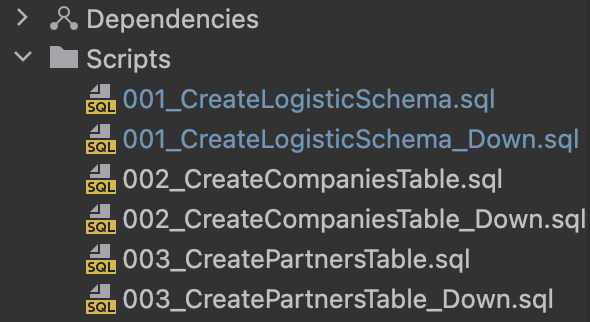
Now, if you want to perform forward migration and execute scripts on a server, you can do it with the following invocation:
var result = migrator.PerformUpgrade();
If you want to perform rollback, you would want to set a specific target script (as in point-in-time) and downgrade the database changes to that point. For that purpose you would have to filter out down scripts and pass them to migrator instance.
var rollbackTargetScript = assembly
    .GetManifestResourceNames()
    .First(name => name.Contains(rollbackTarget));
var scriptsForDowngrade = assembly.GetManifestResourceNames()
    .OrderByDescending(name => name)
    .Where(x => !x.EndsWith("_Down"))
    .TakeWhile(name => !name.Contains(rollbackTarget))
    .Append(rollbackTargetScript)
    .ToArray();
var result = migrator.PerformDowngradeForScripts(scriptsForDowngrade);
It’s worth noting that in the previous code we also included the rollback target script to be downgraded as well: .Append(rollbackTargetScript). This is purely option I chose, but you can excluded it if that’s the way you prefer. Also, in order to filter it properly, an ordering criteria is important, so make sure your migration script file include order number or timestamp in their title.
If we would set rollback target, for example, to 002_CreateCompaniesSchema.sql, the downgrade would perform all necessary rollbacks starting from the last journal’s downgradescript working it up to the target. After the downgrade, our journal table would look like this:

Known issue
At the moment of writing this blog post, there is one issue concerning the updating of down scripts. Since your downgrade values are filled in the journal at the migrations run, if you have updated any corresponding _Down scripts afterwards, these changes won’t be propagated to the journal in the following migrations run.
Conclusion
In any case, it’s my opinion that this library can reduce the overhead of implementing your own solution for the downgrade if you have already chosen DbUp for it’s benefits. And perhaps contribute to it if you find a lack of any additional features that you need.