 CleverHeap
 Aleksandar Bjelosevic
 Vladimir Marinkovic
Introduction
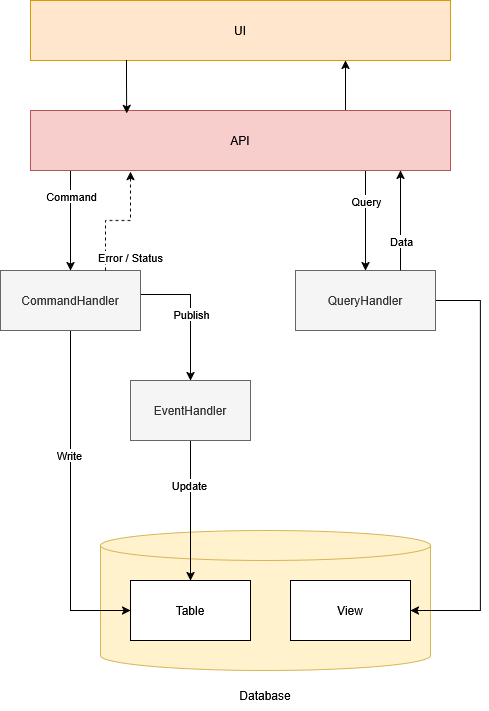
CQRS pattern stands for Command Query Responsibility Segregation. The idea was derived and evolved from CQS pattern, previously introduced by Bertrand Meyer in his book Object-Oriented Software Construction. The both patterns agree on the formal definitions and separation of Commands and Queries:
- commands represent actions that alter the current state of the system,
- queries are ways to read the current state of the system.
In those terms, CQRS, as an architectural pattern, separates write models from read models. It is also complementary with HTTP protocol where altering actions POST, PUT, PATCH, DELETE are reserved for write or command side and GET for read or query side.
CQRS
Reason
To better understand the benefits of using CQRS, we have to understand the problem that CQRS is solving. The problem lies in combination of two factors: collaborative work and data staleness. For example, imagine we have a system with a patient record that can simultaneously be altered by many actors (i.e. users or other software). Lets presume a nurse and a doctor are accessing a patient’s record, and at the same time altering a patient’s data. In such unhinged event, one actor might not be aware of the changes of the other actor since it’s data is stale representation at that particular time, which can result in error of judgment.
Not all the systems require immediate or real time change to be distributed to all clients. Sometimes, it is sufficient that the data renewal can be eventual. With frontend patterns will demonstrate different cases for handling required levels of data staleness.
Benefits
Systems can rely on layered architecture where each request is also responsible for returning the result (i.e. sequential behavior). For example, think of HTTP POST request as a create command and HTTP POST response that reflects a new state - result of its mutation. In such case, the data might be already altered by the time of the receiving the result. Due to stale result, we now need an additional way to perform refetching (referred as query), otherwise we would be limited to consider results as the only source of truth.
In the case of CQRS the command doesn’t need to return any result. If the HTTP POST responses with status 200, client can deliberately consider the request’s payload data as a source of truth and spare a round trip to the server. In most use cases, commands that create records can usually return record ID or multiple records IDs (in batch use cases). This is not a hard rule, exception can be made whenever needed. For example, in case of pop() stack command - result is mandatory and has to be returned. Commands can also side-effect an event to notify the interested actors that the data they have are staled and modified. In some cases, we can also present the current list of commands that are in progress or completed.
We can conclude that command’s purpose is only to track the state mutation success, while query purpose is to deliver state as a source of truth for the system. With that segregation approach, CQRS provides more flexibility when it comes to designing data exchange interface between clients and servers.
Lets extend the previous example in one more detail, lets say a doctor, besides entering patient’s prescription, also adds a contact for a family member. As she tries to submit the form, the request is denied due to prescription detection against patient’s known allergies (e.g. past entries by a nurse). Due to the error, none of the data are saved including the contact data of a family member. With the case of CQRS, we could benefit by splitting it into two commands - one for entering family member contacts and the other for entering patients prescription that requires allergies detection.
It’s important distinction that none of commands need to carry the burden of forming comprehensive query results since each command success is sufficient for UI to indicate the success on changes and that (optionally) a query invoke is necessary for fresh fetch. Queries in many cases are denormalized data projections prepared either by the same data source (SQL views in relational databases) or by different data source that is read optimized (read replica) that is periodically synced with the main source (notice that period can also cause data staleness, so the acceptable ranges should be defined).
Event Sourcing
Another option that fits quite well with CQRS is Event Sourcing pattern. Once a command is successfully handled, the system would publish an event accompanied with sufficient data to indicate the completion and notify other subscribers. Event Sourcing extends on the idea: with the sufficient events aggregated we can always represent the current state of the system.
To provide such ability Event Sourcing pattern is always accompanied with Event Store database. Such data store that provides both document and event-based storages. Document-based storage is used for storing query projections while event-based storage is used for storing the event records (side effects of commands). From queries perspective, we can benefit from the most recent changes by querying event-based store directly or choose to use projections in cases where data staleness is more relaxed (can be stale if the document projections are asynchronously updated on every event change instead synchronously).
Although, understanding data stores is big factor in CQRS architecture, the frontend part should not be overlooked. Frontend, as well as UI/UX, needs to be complemental as a part of the whole architecture.
Frontend Patterns
Now that we have established CQRS as our architectural choice for backend application, let’s look at the approach that is beneficial for the frontend side.
In the near past, most of CQRS implementations tended to set queries operations as near to the web tier in order to benefit from lesser latency and from caching server requests. This would still be preferable option for the most of the server side rendered applications. But, modern frontend frameworks and libraries brought their own caching strategies (e.g. state managers) that benefit us to react more quickly, and easily change parts of UI. Note that having response caches on both ends - frontend and backend side, would cause a lot of issues and misalignments in maintaining consistency. To make it more clear, from know on, we’ll focus on what is the most convenient option that React (and similar libraries/frameworks) can offer us in terms of caching for SPA applications and keep server side caching out of the scope.
Tanstack
Instead of waiting for a user interaction to activate another rendering and refresh stale data, the libraries such as TanStack React Query can help us maintain data staleness by tracking the success of commands and fetching data from queries.
In it’s essence, React Query is a wrapper around HTTP client that provides response caching and methods on how/when to invalidate some caching record and refetch fresh data. It is implemented using Observer pattern where any React component can be a subscriber to cache topics (i.e. cache keys). Any cached record is part of in-memory key/value store where it remains until invalidation occurs due to time expiration or explicit code invocation.
Pattern: Invalidate and Refetch
Lets say we performed AddFamilyMemberContact command and within that altered patient details. As a result, we would prefer to invalidate cache record with the key “patient:0087”. After invalidation, the React Query observer can notify components to rerender with re-fetched fresh patient’s data.
// +++++++++++++++++++++++++++++++++
// ++ Patient's details component ++
// +++++++++++++++++++++++++++++++++
const { data: patient } = useQuery({
  queryKey: ['patient', id],
  queryFn: getPatientDetails,
})

// ++++++++++++++++++++++++++++++
// ++ Patient's edit component ++
// ++++++++++++++++++++++++++++++
const mutation = useMutation({
  mutationFn: addFamilyMemberContact,
  onSuccess: (patientId) => {
    // Invalidate and refetch
    queryClient.invalidateQueries({ queryKey: ['patient', patientId] })
  },
})
Pattern: Notify and Invalidate
When it comes to use cases where multiple users collaborate on the same data records, it could be imperative that the latest changes are display at the near real time. If this is the case, we can leverage on web sockets and corelate their events to proper query key invalidation. The following code snippets demonstrate the case where any event received about changes on patient’s document will cause the cache invalidation, so the latest data can be fetched.
// ++++++++++++++++++++++++++++++++
// ++ Patient's notification hub ++
// ++++++++++++++++++++++++++++++++
export function usePatientHub({
  patientId,
  userId,
  onPatientDetailsChanged
}: UseSignalROptions) {

  const connectionRef = useRef<HubConnection | null>(null);
  const [isConnected, setIsConnected] = useState(false);

  const onPatientDetailsChangedRef = useRef(onPatientDetailsChanged);
  onPatientDetailsChangedRef.current = onPatientDetailsChanged;

  useEffect(() => {
    const connection = new HubConnectionBuilder()
      .withUrl("/hubs/patient")
      .withAutomaticReconnect()
      .build();

    connectionRef.current = connection;

    connection.on("PatientDetailsChanged", (msg: PatientDetailsChangedMessage) => {
      onPatientDetailsChangedRef.current(msg);
    });
  }, [patientDetailsId, userId]);
}

// ++++++++++++++++++++++++++++++++++
// ++ Patient's details component ++
// ++++++++++++++++++++++++++++++++++

// ── SignalR: real-time events ──
const { isConnected } = useSignalR({
  patientId,
  userId,

  onDetailsChanged: useCallback(
    (msg: PatientDetailsChangedMessage) => {
      if (msg.editedBy !== userId) {
        // ── invalidate query cache so it re-fetches
        // the latest details from the REST API.──
        queryClient.invalidateQueries({
          queryKey: ['patient', patientId],
        });
      }
    },
    [userId, queryClient]
  )
});

// ── Save details changes handler ──
const mutation = useMutation({
  mutationFn: (body: UpdatePatientDetailsRequest) => updatePatientDetails(id, body),
});
//...
const handleSave = async (request: UpdatePatientDetailsRequest) => {
  await mutation.mutateAsync(request);
};
Pattern: Prefetching
You can track user attention in order to prepare query result by prefetching the latest data. If a user hovers over an HTML element (e.g. a button, link, tab etc.), we can use such information to fire a prefetch API call. At the time of rendering the component will already use a cached response.
// +++++++++++++++++++++++++++++++++
// ++ Patient list item component ++
// +++++++++++++++++++++++++++++++++
const handlePrefetch = useCallback(
  (id) => {
    queryClient.prefetchQuery({
      queryKey: ['patient', id],
      queryFn: () => fetchPatientDetails(id),
      staleTime: 5_000, // don't re-prefetch if already fresh
    });
  },
  [queryClient]
);

//...

return (
<div>
  <button key={patient.id}
          onMouseEnter={() => handlePrefetch(patient.id)}
          onFocus={() => handlePrefetch(patient.id)}
          onClick={() => onClick(patient.id)}>
    Details
  </button>
</div>);
Pattern: Manual Cache Update
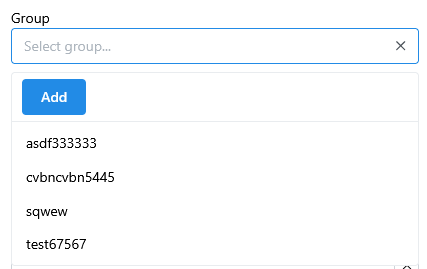
In cases when we deal with creation of a new record, sometimes it can be convenient to manually add a new record to the cache upon successful confirmation with response - HTTP 200 OK. Instead of invalidating the cache, which would cause another round trip to the server side, we can make action more responsive without unnecessary rerendering. The usual use case can be a select or dropdown with a lot of items or search list.
// +++++++++++++++++++++++++++++++++++++++
// ++ Doctor's create modal form dialog ++
// +++++++++++++++++++++++++++++++++++++++
const handleSubmit = (values: CreateDoctorRequest) => {
  mutate(values, {
    onSuccess: () => {
      const newDoctor = { id: addedItemId, fullName: values.fullName };
      queryClient.setQueryData(['doctors'], newDoctor);
    }
  });
};
Pattern: Paginated and Infinite Queries
In cases where the application uses paginated views or infinite scroll, it would be beneficial to refrain from frequent fetching and leverage more on cached data from previously visited pages. This is easily achieved by keeping the placeholder data between re-fetches. It also helps that the page is not in loading state during fetch, but instead previewing stale data until fresh page response arrives.
// ++++++++++++++++++++++++++++++++++++++++++++++
// ++ Custom base type for data table response ++
// ++++++++++++++++++++++++++++++++++++++++++++++
export type DataTableQueryResponse<T> = {
  items: Array<T>;
  totalItemCount: number;
  pageCount: number;
  pageSize: number;
  count: number;
  hasPreviousPage: boolean;
  hasNextPage: boolean;
  isFirstPage: boolean;
  isLastPage: boolean;
  firstItemOnPage: number;
  lastItemOnPage: number;
}

// +++++++++++++++++++++++++
// ++ Patients data table ++
// +++++++++++++++++++++++++
const {data, isLoading } =
 useQuery<DataTableQueryResponse<PatientItemResponse>>({
      placeholderData: keepPreviousData,
      queryKey: ["patients", fetchURL],
      queryFn: async () =>
      {
        return await getPatientsListPage(fetchURL);
      }
  });
Conclusion
It is our belief that implementation following CQRS pattern should not neglect the understanding of frontend part. If anything, both backend and frontend side must remain complementary in implementing CQRS pattern.
Our opinion is that designing API and components in a way of CQRS can lead to smoother and more elegant user experience by fractionating parts to commands/mutations and queries. Additionally, with the shown frontend patterns we can notice that there is no need for a big orchestration of the state management. Instead atomicity and low scope of commands affect only a subsequent of cached data, making code succinct and easy to maintain.
For a more different aspects of usage patterns, we recommend checking the Tanstack Query official documentation.